
Save the Date Template
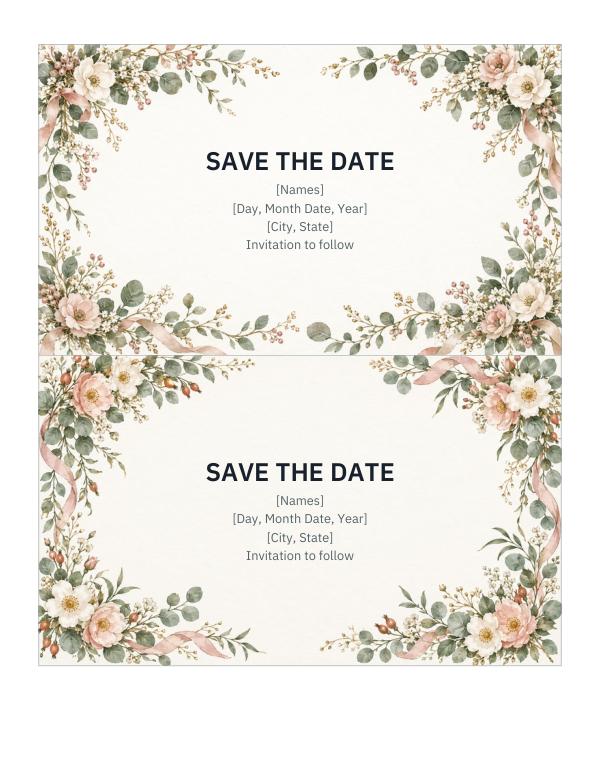
A save the date tells guests to keep the day free before the full invitation arrives. Fill in your names, the date and the location, pick a layout and colours, add an engagement photo if you like, and this template makes a clean, print-ready card you can download as an image for printing or sending online.
- Free to use
- No sign-up
- Runs in your browser
Save the date card maker
Wedding Stationery Templates
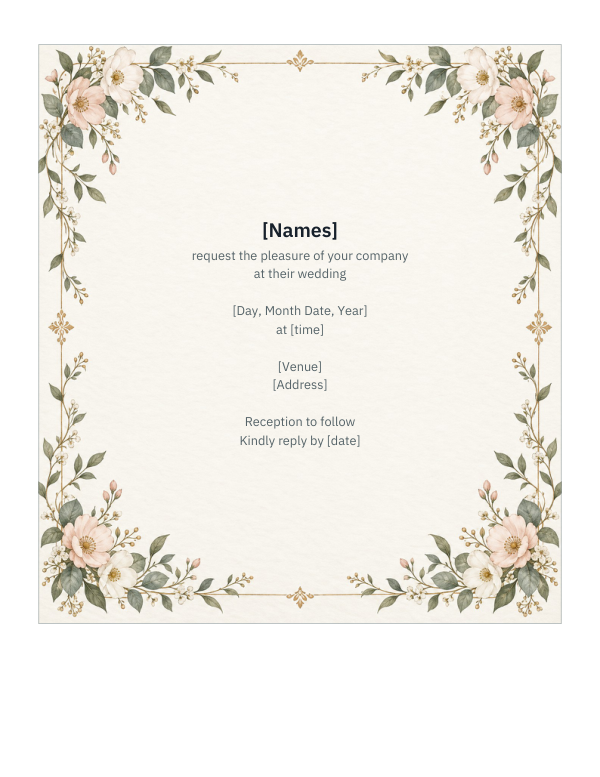
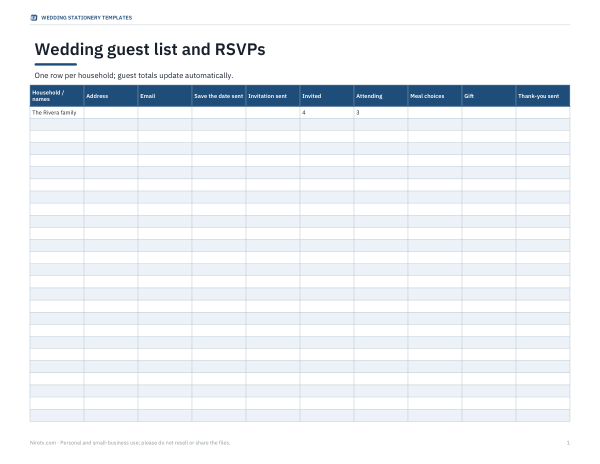
Editable Word save the date and invitation templates, an Excel guest list with addresses and RSVP tracking, envelope address templates and a stationery timeline.
- Save the date (DOCX/PDF)
- Invitation (DOCX/PDF)
- Guest list (XLSX)
- Envelope template (DOCX/PDF)
- Timeline (PDF/XLSX)
Formats: DOCX, PDF, XLSX. Instant download after payment (link valid 72 hours, up to 5 downloads). AI-assisted: the templates were drafted with AI help and reviewed and laid out before publishing.
$5.00 USD, one-time 5 files · about $1.00 each
- Instant download
- 7-day refund
- Secure checkout by Stripe
7-day money-back guarantee. Full refund within 7 days of purchase, even after you download.
Free sample: Envelope Address Template (PDF, 297 KB)
Full refund within 7 days — see the refund policy and license.
Free printables
Single sheets you can print right now, no sign-up. The full pack adds every sheet in one download plus the editable files.
 Printable Envelope Template
 Printable Wedding Timeline Chart
What goes on a save the date
| Include | Example |
|---|---|
| Your names | Amara & Leo |
| The date | Saturday, June 12, 2027 |
| City and state/country (venue optional) | Madison, Wisconsin |
| A note that a formal invitation will follow | “Invitation to follow” |
| Wedding website (optional) | For travel and hotel details |
Keep it short — times, dress code and RSVP details belong on the invitation itself.
When to send save the dates
| Wedding type | Send save the dates |
|---|---|
| Local wedding | About 6–8 months before |
| Destination wedding or holiday weekend | About 8–12 months before |
| Short engagement | As soon as the date and city are fixed |
Invitations usually follow about 6–8 weeks before the wedding (earlier for destination weddings). Only send a save the date to people you are certain to invite.
Wording ideas
- Save the date · Amara & Leo · June 12, 2027 · Madison, Wisconsin · Invitation to follow
- We’re getting married! Please save the date…
- Amara and Leo are tying the knot — mark your calendars
- Save the date for the wedding of Amara Okafor and Leo Martins
- Formal invitation to follow · details at our website
How to use the card maker
- Type your names, date, location and a note or website.
- Choose a style: classic serif border, modern colour band, garden leaves, or photo on top.
- Pick a size — 5 × 7 in is the most common; 4 × 6 in and postcards cost less to print and post.
- Upload a photo for the photo style (it stays on your device).
- Download a 300 dpi PNG to send to a print shop or online printer, or print two cards per page at home on card stock.
Worked example
Choosing 5 × 7 in and downloading the PNG gives an image of 1,500 × 2,100 pixels (5 × 300 by 7 × 300) — the resolution print shops usually ask for. For a 4 × 6 in card the file is 1,200 × 1,800 pixels. If you print at home, set the printer to Actual size and use heavyweight card; trim to size with a paper cutter.
Printing and posting tips
- Order a single proof before printing the full run.
- Standard card sizes fit standard envelopes: A7 envelopes for 5 × 7 cards, A6 for 4 × 6.
- Postcards are cheaper to mail in many countries; check postal size rules.
- Heavier or square cards can cost more to post.
- Address envelopes neatly or print labels — the save the date is guests’ first impression.
Photo tips
For the photo style, choose a landscape-orientation picture with space around your faces; the card crops the photo to fill the top half. Bright, simple backgrounds print best, and a photo at least 1,500 pixels wide keeps a 5 × 7 card sharp. The photo never leaves your device — it is combined with the text in your browser.
Save the date etiquette
- Everyone who gets a save the date must get an invitation — only send them once the guest list is final.
- Address them the same way you’ll address invitations, including plus-ones and children if they are invited.
- If you are not inviting children, don’t list them on the envelope.
- Mention the city even if the venue isn’t booked; out-of-town guests need it to plan travel.
- If plans change, let everyone know promptly with a “change the date” card or message.
Choosing a style
The card sets the tone for the wedding. A classic serif border suits formal or traditional weddings; the modern colour band suits city venues and simple celebrations; garden leaves suit outdoor and summer weddings; and a photo card is personal and fun. Match the accent colour to your wedding colours so the save the date and invitations look like a set.
Digital save the dates
Sending the PNG by email or messaging is quick, free and eco-friendly. Many couples email most guests and post printed cards to older relatives. Include the date and city in the message text too, so it shows up in search if guests look for it later.
Privacy
The card is created in your browser. Names, dates and any photo you add are not uploaded; they stay on your device and appear only in the files you download or print.
Wedding stationery pack
The optional pack includes editable Word save the date and invitation templates, an Excel guest list with addresses and RSVP tracking, envelope address templates and a stationery timeline. The card maker above is free.
AI-assisted content
This page was drafted with AI assistance and reviewed before publishing. Names and places in examples are fictional.
Frequently asked questions
When should save the dates go out?
About 6–8 months before a local wedding and 8–12 months before a destination wedding.
What size is a save the date?
Commonly 5 × 7 in, 4 × 6 in or postcard size.
Do save the dates need an RSVP?
No, the RSVP goes on the formal invitation.
Can I add a photo?
Yes, choose the photo style and upload a picture; it stays on your device.
What resolution is the download?
300 dpi — e.g. 1,500 × 2,100 pixels for 5 × 7 in.
Can I send it digitally?
Yes, email or message the PNG.
Do I need to send save the dates?
They are optional, but helpful for destination weddings, holiday weekends and guests who travel.
Can I use the PNG with an online printing service?
Yes, it is 300 dpi at the chosen size, which most printers accept.
What paper should I print on at home?
Heavyweight matte or linen card stock, about 80–110 lb cover (215–300 gsm).
Can I change the fonts?
The maker uses classic serif and clean sans-serif fonts; for other fonts, use the Word template in the pack.